
Is PUBG Mobile Cross Platform in 2026? The Complete Truth

Yes — PUBG Mobile is cross-platform between Android and iPhone. Both operating systems share the same servers, matchmaking pool, friend lists, and clan systems without any restrictions. However, PUBG Mobile does not support crossplay with PC, PS5, or Xbox. Those platforms run an entirely different game called PUBG: Battlegrounds, and the two ecosystems have no connection whatsoever.
That single distinction — PUBG Mobile versus PUBG: Battlegrounds — is where 90% of the confusion comes from.
Now here is why it matters for you. If your friend is on iPhone and you are on Android, go ahead and squad up right now. But if someone in your group is on a PlayStation, a gaming PC, or an Xbox, they are playing a different game on different servers. No invite trick, no settings toggle, no workaround will bridge that gap in 2026.
Here is the full picture so you never waste an evening on broken invite screens again.
Cross-platform play matters most when your squad is split between touch and controller — if that’s you, our guide to playing PUBG Mobile with a controller and our breakdown of the best PUBG Mobile control settings are worth pairing with this one. Squads that span platforms also tend to run longer sessions, so knowing how to save battery while gaming on mobile is worth bookmarking. And if you’re still deciding which battle royale deserves that cross-platform squad time, our honest PUBG Mobile vs Free Fire verdict lays out the real differences.
PUBG Mobile Cross-Platform Compatibility Table (2026)
| Platform Combination | Crossplay Supported? |
|---|---|
| Android ↔ iPhone (iOS) | ✅ Yes — Full crossplay |
| Android ↔ iPad | ✅ Yes — Full crossplay |
| iPhone ↔ Android Tablet | ✅ Yes — Full crossplay |
| PUBG Mobile ↔ PC (Steam/Epic) | ❌ No |
| PUBG Mobile ↔ PS5 | ❌ No |
| PUBG Mobile ↔ Xbox Series X|S | ❌ No |
| PUBG Mobile ↔ PUBG New State | ❌ No |
| PUBG Mobile ↔ BGMI | ❌ No (separate region build) |
| PUBG Mobile (Phone) ↔ GameLoop Emulator (PC) | ⚠️ Partial — Emulator-only lobbies |
Bookmark this table. It covers every combination players ask about, and the answers have not changed since 2024 — nor are they expected to change through the rest of 2026.
PUBG Mobile Cross-Platform Ecosystem: Visual Overview
[Infographic placement: embed the SVG visual here in your CMS — see attached file]
        ┌─────────────────────────────────────┐
        │         PUBG MOBILE SERVERS         │
        │   (iOS + Android share this pool)   │
        └──────────────┬──────────────────────┘
                       │
          ┌────────────┴────────────┐
          │                         │
    ┌─────▼─────┐             ┌─────▼─────┐
    │  Android  │             │    iOS    │
    │   ✅ In   │             │   ✅ In   │
    └───────────┘             └───────────┘

          ❌ NOT CONNECTED TO PUBG MOBILE:

    ┌───────────┐    ┌───────────┐    ┌───────────┐
    │    PC     │    │    PS5    │    │   Xbox    │
    │ Steam/Epic│    │           │    │  Series   │
    │   ❌ Out  │    │   ❌ Out  │    │   ❌ Out  │
    └───────────┘    └───────────┘    └───────────┘
              (These run PUBG: Battlegrounds — a different game)
What “Cross Platform” Actually Means in PUBG (And Why Everyone Gets Confused)
Here is the thing nobody tells you upfront: PUBG is not one game. It is three separate universes that share a name, a logo, and almost nothing else.
My friend learned this the hard way last year. He was on his Samsung Galaxy S24. His roommate had a PS5. His cousin was on an iPhone. A fourth buddy was on a gaming PC running Steam. Four players, one group chat, zero chicken dinners. Two hours of confused staring at invite screens that refused to cooperate.
The source of that confusion is the product split.
PUBG: Battlegrounds runs on PC (Steam and Epic Games Store) and current-gen consoles (PS5 and Xbox Series X|S). Developed and maintained by Krafton directly. As of November 13, 2025, PS4 and Xbox One support ended — this is now a current-gen-only title. For more on the latest Battlegrounds updates, [check our full PUBG Mobile update tracker at dzoneonline.com].
PUBG Mobile runs on iOS and Android, built under license by Tencent Games. Separate engine, separate servers, separate development schedule. This is the version most mobile gamers mean when they ask about PUBG Mobile crossplay support.
PUBG New State is a third mobile title by Krafton with improved graphics and physics. It supports iOS and Android cross-play within its own ecosystem but shares no server connection with PUBG Mobile.
None of these three products share a matchmaking pool. They never have. The branding is visually identical, the maps share names, but the architecture underneath is completely different.
Android and iPhone PUBG Mobile Cross-Play: How It Actually Works
This is where PUBG Mobile crossplay delivers. An iPhone player and an Android player can squad up, matchmake together, use voice chat, join the same clans, and appear on each other’s friend lists. There are no restrictions based on operating system.
Whether your friend is on a Samsung Galaxy S25 running Android 15, a Xiaomi Redmi Note 13, or an iPhone 16 Pro Max on iOS 18 — you are in the same matchmaking pool. The game does not check what phone brand you have. It checks your game version, your server region, and your account link status.
Account progression also syncs across devices. Link your PUBG Mobile account to Facebook, Google Play Games, Apple ID, or Twitter, and every skin, rank, UC balance, and Royale Pass milestone follows you to any mobile device you sign into. Switch from an Android phone to an iPad mid-season? Nothing is lost. This is one area where PUBG Mobile’s account system genuinely delivers for cross-device players.
The only friction points for iOS-Android crossplay are version mismatches and server region mismatches — both of which are easy to fix (covered in the setup guide below).
Why PUBG Mobile Cannot Play with PC or Console
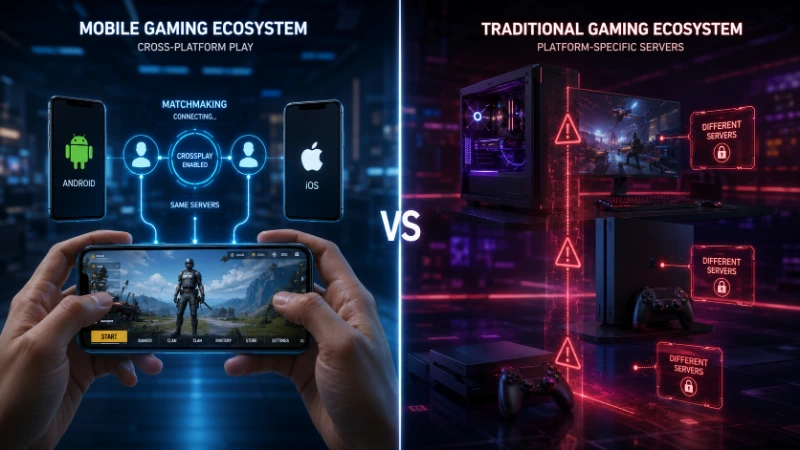
This is not a business decision or a lazy oversight. The barriers are genuinely technical and competitive.
Input method disparity is the most visible problem. A PUBG Mobile player uses a touchscreen. Even the most skilled four-finger claw grip player is at a fundamental precision disadvantage against a mouse-and-keyboard PC player, where target acquisition happens in milliseconds. Mixing these input types in the same lobby would not feel like a fair fight. Fortnite handles this with input-based matchmaking — controller users match against controller users, keyboard-mouse against keyboard-mouse, regardless of hardware. PUBG has not implemented this solution.
Engine architecture is the deeper barrier. PUBG Mobile was built on a modified Unreal Engine specifically optimized for mobile chipsets. Recoil patterns are tuned differently. Time-to-kill values are adjusted for shorter mobile sessions. Aim assist is more generous than on PC. Maps share names with the PC versions but differ in layout and physics. These are not cosmetic differences — they are fundamental to how the game plays.
Server infrastructure does not overlap. PC, console, and mobile versions of PUBG run on entirely separate backend systems. Merging them would require significant engineering investment that is not currently on Krafton’s public roadmap. Their 2026 priorities, based on official announcements, include console infrastructure upgrades, destructible terrain on Erangel, and new game modes — not cross-ecosystem server bridges.
The studio split compounds everything. Krafton built and maintains PUBG: Battlegrounds. Tencent Games built PUBG Mobile under a licensing agreement. Two companies, two codebases, two release schedules. Even if both wanted crossplay tomorrow, the cross-company technical coordination would be enormous. For official platform information, Krafton publishes updates at pubg.com and PUBG Mobile’s team maintains pubgmobile.com.
The Emulator Question: GameLoop, PC, and PUBG Mobile
Here is a detail most PUBG Mobile cross-device guides completely miss.
You can play PUBG Mobile on a PC using GameLoop — Tencent’s official Android emulator. But this does not give you crossplay with PUBG: Battlegrounds. You are still playing PUBG Mobile, just on a bigger screen with a mouse and keyboard. The game knows exactly what you are doing.
PUBG Mobile detects emulator usage through input recognition. Queue through GameLoop, and the matchmaking system flags your session and routes you into emulator-only lobbies. You will not drop into standard mobile matchmaking against touchscreen players.
The squad behavior here catches people off guard. If you are a regular touchscreen player and you invite a GameLoop friend into your squad, your entire squad moves into emulator-only lobbies — not just that one player. Those lobbies run harder on average because keyboard-and-mouse users have a real input edge. Worth knowing before you invite your emulator friend mid-ranked-season. For everything about setting up PUBG Mobile on desktop, [our PUBG Mobile emulator guide at dzoneonline.com] covers the full GameLoop setup process.
Setup takes about six minutes. But be clear on what you are getting: PUBG Mobile on a desktop screen, in a harder lobby pool, with zero connection to the PC or console versions of the game.
PUBG Mobile Cross-Progression: What Carries Over (And What Disappears)
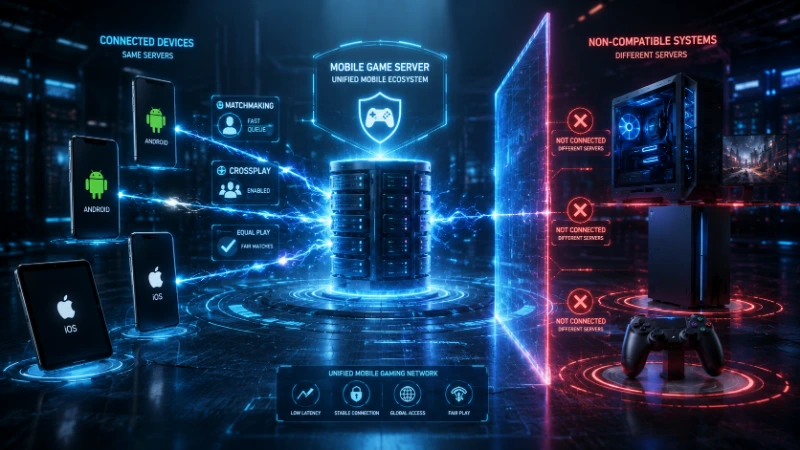
Cross-progression and crossplay are different things, and it is worth separating them clearly.
Within PUBG Mobile: Everything syncs. Link your account to a social login — Facebook, Google, Apple ID — and your rank, skins, UC balance, and Royale Pass progress follow you to every iOS and Android device you sign into. Switch phones mid-season without worry. Managing your PUBG Mobile account settings properly from day one protects everything you earn.
Between PUBG Mobile and PUBG: Battlegrounds: Nothing transfers. Your PUBG Mobile account has no connection to the PC or console game. Start fresh if you ever cross over. Skins are not shared. Currency is not shared. Rank history is not shared. This is a consistent community complaint that Krafton has not addressed as of mid-2026.
For PUBG: Battlegrounds players who moved from PS4 or Xbox One to current-gen hardware after the November 2025 update: existing console account data and purchased items were preserved within the same console ecosystem. But that is a within-platform transition, not cross-platform progression.
How PUBG Mobile Compares to Competitors on Cross-Play
The battle royale genre has moved decisively toward broader cross-platform support over the last two years. PUBG Mobile’s mobile-only crossplay now looks more limited by comparison.
Fortnite allows iOS, Android, PC, PS5, Xbox, and Nintendo Switch players to all share the same lobbies. Input-based matchmaking keeps controller users against controller users, keyboard-mouse against keyboard-mouse. It is the most ambitious cross-platform implementation in the genre and sets the community expectation that PUBG Mobile is consistently measured against.
Call of Duty: Mobile takes a similar approach to PUBG Mobile: iOS and Android crossplay supported, PC and console versions completely separate. Controller support exists within COD Mobile, and controller players are automatically separated from touchscreen players to maintain fairness — something PUBG Mobile has not implemented.
Battlegrounds Mobile India (BGMI) is the India-specific build of PUBG Mobile. Same crossplay rules: iOS and Android share lobbies, no PC or console connection. BGMI and PUBG Mobile players also do not share servers despite running nearly identical games.
Where PUBG Mobile genuinely falls short is progression portability. Fortnite’s account carries your cosmetics across every device. PUBG Mobile keeps you locked within the mobile ecosystem. For a player base increasingly used to owning items that follow them everywhere, this is a real friction point that competitors are exploiting.
PC and Console PUBG Cross-Platform Status in 2026 (For Context)
Many players searching PUBG Mobile crossplay questions are actually trying to understand the broader PUBG picture. Here is the current state for PUBG: Battlegrounds.
PC crossplay: Steam and Epic Games Store players share the same matchmaking pool. If you are on Steam and your friend bought through Epic, you play together with no friction.
Console crossplay: PS5 and Xbox Series X|S players share the same console matchmaking pool. Cross-console play works well. After November 13, 2025, PS4 and Xbox One support ended entirely. The game is current-gen only. Existing last-gen account data was preserved for players who upgraded.
PC and console do not crossplay with each other. The mouse-and-keyboard versus controller fairness problem applies here just as it does to mobile integration. Krafton has not announced input-based matchmaking as a solution, and no full PC-console crossplay appears on the public 2026 roadmap.
For the detailed console setup guide including how to enable cross-platform play in your settings menu, [see our PUBG console guide at dzoneonline.com].
Will PUBG Mobile Ever Get Cross-Platform with PC or Console?
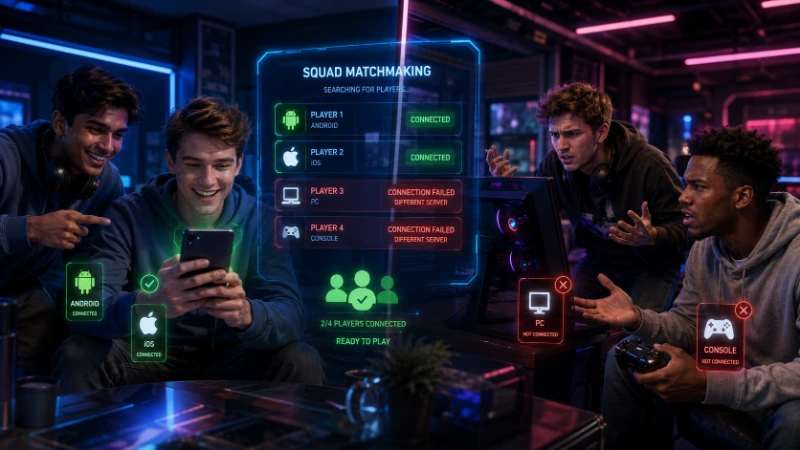
This is the question the PUBG community has asked for years. Here is an honest read based on available evidence.
Krafton has repeatedly emphasized competitive integrity in investor communications. They are not going to merge mobile and PC/console lobbies in a way that disadvantages either group. That would risk alienating two very different and very large player bases simultaneously.
The most realistic path to broader crossplay — if it ever comes — would follow the Call of Duty model. Input-based matchmaking where controller players match against each other and keyboard-mouse players match against each other, regardless of hardware. This could potentially allow PS5 and PC players to share lobbies. It requires significant engineering work and platform partnership agreements with Sony and Microsoft, which take considerable time to negotiate.
Mobile integration is a different and harder problem. Even in the most optimistic crossplay expansion scenario, PUBG Mobile would almost certainly remain excluded. You cannot reasonably ask a mid-range Android device running PUBG Mobile to compete in lobbies with a PS5 running PUBG: Battlegrounds at 60fps on a current-gen engine. The gap is too wide technically and competitively to bridge in any meaningful way.
As of mid-2026, Krafton has made no announcement suggesting either PC-console crossplay or mobile-PC crossplay is in development. If you are waiting for that change, manage your expectations accordingly — and focus on what PUBG Mobile does well within its own ecosystem instead.
Step-by-Step Setup Guide: PUBG Mobile Cross-Play for iOS and Android
If you and your friend are on different mobile operating systems and struggling to connect, here is the exact fix.
Step 1 — Confirm your game version. Open the App Store (iOS) or Google Play Store (Android) and verify PUBG Mobile is fully updated. Both players must be on the same major version. This is the number one cause of failed invites and is fixed in under two minutes.
Step 2 — Link your account immediately. Go to Settings, then Basic, then Account. Connect to Facebook, Google, or Apple ID. This is the single most important PUBG Mobile settings step you can take. It protects your progress across devices and makes your friend list persistent regardless of what phone you switch to.
Step 3 — Set your server region. Go to Settings, then Server Region. If you and your friend are in different countries, set both devices to the same regional server. Cross-region play works but expect latency above 150ms which affects movement prediction and hit registration.
Step 4 — Add friends by Player ID. Open the Social tab, search by Player ID or in-game nickname. This cross-platform friend system works identically for iOS and Android accounts. Once added, send a squad invite directly from the lobby.
Step 5 — Clarify emulator status before queuing. If anyone in your squad is on GameLoop, your entire squad moves into emulator-only lobbies. Everyone should know this before you hit ready. Emulator lobbies are a different competitive environment than standard PUBG Mobile multiplayer matchmaking.
PUBG Mobile Cross-Platform FAQ
Can I play PUBG Mobile with my friend on PS5?
No. PUBG Mobile and PUBG: Battlegrounds on PS5 are entirely separate games on separate servers. There is no way to connect them in 2026, and Krafton has not announced plans to change this.
Can Android play with iPhone in PUBG Mobile?
Yes, completely. Android and iOS players share the same matchmaking pool, friend system, and voice chat in PUBG Mobile. No restrictions, no separate settings needed.
Can PUBG Mobile crossplay with PC?
Only through GameLoop emulator, and even then you are still in PUBG Mobile — not PUBG: Battlegrounds. Your squad will enter emulator-only lobbies, not standard mobile matchmaking.
Is PUBG Mobile cross-platform with Xbox?
No. Xbox runs PUBG: Battlegrounds, a different game. There is no crossplay between PUBG Mobile and any console version.
Can I transfer PUBG Mobile skins to PC or console?
No. Your cosmetics, UC, and rank are locked to the PUBG Mobile ecosystem. They do not transfer to PUBG: Battlegrounds on any platform.
What is PUBG Mobile cross-device support like between phones and tablets?
Fully supported. An Android phone player and an iPad player can squad up in PUBG Mobile without any restrictions. Tablets and phones are treated identically within the iOS/Android pools.
Will PUBG Mobile ever support cross-platform play with consoles?
Krafton has made no announcement suggesting this is planned. The technical barriers — engine differences, input disparities, and separate server infrastructure — make it unlikely in the near term.
Does using a controller in PUBG Mobile put me in console lobbies?
No. Controller use within PUBG Mobile does not connect you to console matchmaking and does not move you to a separate controller pool within the mobile ecosystem.
Why does PUBG Mobile have separate emulator lobbies?
To protect fairness for touchscreen players. Mouse-and-keyboard input detected by GameLoop carries a significant precision advantage over touch controls. PUBG Mobile separates emulator users to keep standard mobile lobbies competitive.
What is the difference between PUBG Mobile crossplay and cross-progression?
Crossplay means playing together in the same match. Cross-progression means your items and rank carry between platforms. PUBG Mobile supports both — but only within the iOS and Android ecosystem. Neither feature extends to PC or console.
Final Verdict: Know Your Ecosystem, Then Play Without Limits
The PUBG Mobile cross-platform story in 2026 is a story of a well-designed silo. Within its walls — iOS and Android — it works genuinely well. Account sync is smooth. Matchmaking is fast. The friend system works across operating systems without friction. For a game with over 1.3 billion lifetime downloads, that mobile-to-mobile crossplay serves an enormous community effectively.
What it cannot do is bridge the gap to PC and console. That boundary is real, deliberate, and unlikely to move in 2026. Krafton’s competitive integrity position and the genuine technical obstacles mean short-term crossplay with PUBG: Battlegrounds is not on the table.
If you want every device at the table — phone, PC, PlayStation, Xbox, Switch — Fortnite is still the only battle royale that actually delivers that in 2026.
But if your whole squad is on mobile? PUBG Mobile delivers. Link your accounts before anything else. Match your server regions. Update before you queue. Then drop hot and play without worrying about platform barriers.
The only thing that should stop you from winning is the 99 other players trying to outlast you.
What devices are you and your squad playing on right now? Drop it in the comments — if there is a platform combination that is giving you trouble, there is probably a specific fix you have not tried yet.
Sources:
- Krafton official PUBG news: pubg.com
- PUBG Mobile official: pubgmobile.com
- GameLoop official emulator: gameloop.fun
Internal links powered by dzoneonline.com: PUBG Mobile Emulator Guide | PUBG Mobile Update Tracker | PUBG Mobile Settings Guide | PUBG Mobile Tips | PUBG Mobile Account Management | PUBG Console Guide
Last updated: June 2026. Reflects Krafton’s official platform support at time of publication. Check Krafton’s official news pages for the latest crossplay roadmap updates.